ETL Pipeline Improvements

One of my primary responsibilities at my current job is ownership of the ETL pipeline that brings in the data upon which we run our business. Every day it processes hundreds of gigabytes of data, cleaning and normalizing it, and outputting it in several different forms.

For a few years I have been using a Hadoop-based mrjob pipeline on top of AWS EMR. It replaced a (I kid you not) Redshift-based pipeline that was hugely expensive (that I didn't write). It's been very reliable. For the last year or two the only failures have been when AWS's systems have had issues, something I can't do anything about. Despite this reliability, it hasn't been perfect. The biggest problem with it is that it's expensive to run. There are few reasons why it's been so expensive:

  • EMR adds a 25% upcharge on all resources used. It is reasonable for AWS to charge something because EMR is a useful service with added value. However, in my opinion, 25% is too high for what it does. AWS already gets paid plenty because you're using their other services underneath it (mainly EC2 virtual computers and EBS block storage), so the extra mark-up feels like a big cash-grab. It is, of course, entirely possible to run Hadoop on AWS without using EMR. But it is a hassle, and it's likely that AWS has figured out that 25% is the inflection point between too expensive and not worth the hassle

  • Hadoop isn't the most efficient way of doing things. Newer tools, notably Spark, have surpassed Hadoop in both speed and features. I originally used Hadoop because I wasn't happy with how Spark needed quite a bit more memory than Hadoop for a similar operation, but over time I became less and less satisfied with my inability to speed up certain parts of the process

  • AWS offers spot compute instances, which are virtual computers that are significantly cheaper than on-demand instances. The difference is that on-demand nodes are yours as long as you want them, while spot instances can be taken away at any time with only two minutes warning.

    One of Hadoop's killer features is that during a MapReduce cycle, if one or more worker nodes goes away (for whatever reason including spot node removal), in most cases it can recover and redo any lost results.

    However, the EMR pipeline used a multi-step MapReduce process. Unfortunately, Hadoop cannot recover lost results from earlier, fully completed MapReduce cycles. This means that in order to run the pipeline, it had to have enough on-demand instances that the data that needed to be preserved across cycles fit on them. This raised the cost considerably when compared to an all-spot pipeline run

Earlier this year I decided it was time to start looking at how to rewrite the pipeline to dramatically lower costs. I saw two possible ways forward:

  • Choose a modern, high performance tool like Spark/PySpark or Dask that would still run on EMR but hopefully would be much faster

  • Abandon EMR entirely (and its 25% surcharge) and write something that could run completely on spot instances and use S3 for storage, which is four to five times cheaper than EBS

After some thought, I decided that the second option was the better choice. If I could figure it out, it offered the best possible outcome. The pipeline runs once per day, meaning that it has 24 hours to finish before the next run needs to start. Ultimately, high performance was less important than lowering costs.

I have been using Polars quite a bit and have been (mostly1) impressed with its speed and functionality. It is written in Rust, which is one of the fastest programming languages. Polars has a Python-facing API as a first-class member of the project. Rust has an ever-growing library of packages that I've found are high-quality and well documented (in contrast to my experience with cough R packages). The crucial difference between Polars and Hadoop/Spark/Dask is that Polars runs on only one node at a time (it can and does use all the CPU cores), while all of the others can run on multiple nodes. If I could figure out how to slice up the pipeline into chunks that would work on separate instances, I believed I could use Polars in place of Hadoop.

Jumping to the end of the story, I was able to convert the pipeline to use Polars, and to great success. I use a simple pattern for each step. An orchestration process builds a list of work which is submitted to SQS. An EC2 spot fleet is created which launches workers that consume the work. The input and output of the work is stored on S3. The workers send success or failure messages to a callback queue on SQS, which is monitored by the orchestration process. If a spot node goes away interrupting work, the work will be picked up by a different node once the message returns to availability. Once the work is done for a step (i.e. all work has generated a callback), the orchestration process kills the spot fleet and continues to the next step (or sends an error message for a human to figure out).

The bottom line is that the cost has dropped by roughly 85%, primarily due to the following reasons:

  • Polars has the concept of LazyFrames which are data objects that are not realized in memory nor computation until Polars is told to do so. Operations and filtering can be applied to them and Polars can do the work in parallel with efficiency tricks that overall increases speed without loading the whole dataset into memory at once. The combination of sink_parquet with PartitionByKey is effectively a MapReduce operation that is much faster than Hadoop on similar hardware

  • AWS has "regions" and "availability zones (AZs)" which are the physical locations where cloud compute happens. Each AZ is a distinct data center (or close by data centers) within a region. When running an EMR job, you are restricted to a single AZ largely because AWS charges for cross-AZ data transfer, and EMR jobs are very loquacious across the network. There's also increased network latency between AZs. Running and EMR job in multiple AZs would hugely impact performance and cost.

    Because the new pipeline reads from and saves data to S3, and there are no cross-AZ charges for accessing S3 within a region, it doesn't matter which AZ the workers run in. This means that the spot fleets can target all AZs within the region, unlike EMR

  • When launching an EC2 fleet, you must specify one or more launch templates, which describe how to launch each instance in terms of OS and installed software. AWS EC2 offers instances using x86 processors from Intel and AMD, and ARM instances using AWS Graviton processors. Conveniently, the pipeline doesn't require any processor-specific features. Therefore, I created two AMIs, one for each of x86 and ARM, which allows the spot fleet to target any and all of Intel, AMD, and Graviton instances

  • The pipeline requirements for each step basically comes down to number of CPU cores and amount of RAM, more or less of each depending on what the step is doing. The upshot of all of the above is that for a given step all the pipeline cares about is the resources of the node, not what kind of node it is. Of course, not all instances are the same speed, but the cost of an instance is roughly proportional with its speed, so it all works out. This means that for a given step, across all AZs and EC2 instance types, there can be over 100 distinct resource combinations to pick from. This basically guarantees spot availability at all times

  • The pipeline uses a fair number of User Defined Functions. Polars supports UDFs written in Python, Numba, and Rust using PyO3. By using the latter two, basically all of the inner loops and heavy computation in the pipeline happens in compiled C or Rust. This, in my opinion, is a really nice way of doing things. Let Python handle moving data around and high-level stuff, and run all the heavy computation in compiled code.

Overall, I'm very pleased about the results of this work. The goal was to save money, and it has done that. I wasn't expecting 85% savings (I'm not sure what I was hoping for), but I feel quite good about that.

  1. Polars definitely has some frustrating issues, like this one or this one ↩︎

A Polars Memory Leak Trick

I am a big proponent of Polars for data analysis. It combines the ease of Python with the speed of Rust. In many cases it allows working with very large datasets very convenient. I have even written about it before on this blog.

Despite the nice things I wrote above about Polars above, it is still a work in progress. One big issue it has is less than ideal memory management when working with very large dataframes as discussed in this ticket on github. I have seen similar issues with Polars, where for no explicable reason it will run my machine out of memory. Below is a simplified example of a situation that I have run into this problem.

This example is in the middle of a processing pipeline. I have created a set of Parquet files in which I am including an ff column because I want to be able to filter on it. The entire set of Parquet files in dirname would not fit in memory, but a subset will, and I can process these subsets separately and combine the reduced dataframes at the end to achieve the same result. The distribution of values in ff is very even, meaning that each subset uses very closely the same amount of memory. Because ff is in the Parquet files, Polars can use predicate pushdown to filter on ff at the read step, meaning that the full dataset is never read into memory.

Indeed, the first few loops of this process work quite well. The filtered subsets fit into memory, and reduced dataframes are calculated. However, eventually Polars stops managing memory correctly and things go bad, and the machine runs out of memory.

import polars as pl

data = pl.scan_parquet(dirname)

reduced = []

# this will eventually run out of memory
for ff in range(N):
    print("doing", ff)
    # note that data is untouched each cycle
    data1 = data.filter(pl.col("ff") == ff)
    # Do some various LazyFrame manipulations on data1; we don't call
    # .collect() until below
    reduced.append(data1.collect())

reduced_data = pl.concat(reduced)

If the situation is amenable, there is a way around this. By running the Polars steps in a subprocess using multiprocessing, we can force Polars to free memory after each cycle by shutting down the process that runs Polars every cycle. Of course, there is a little bit of additional overhead here. Starting the subprocess takes a little time, as does re-scanning the directory of files in scan_parquet(). There is also some cost in un/pickling the reduced dataframe between the main process and the Polars subprocess. But if the data is large enough to resort to chunking like this, these extra costs are rounding errors, and are not worth worrying about.

from multiprocessing import Process, Queue, set_start_method

def worker(dirname, ff, out_q):
    data = pl.scan_parquet(dirname)
    data = data.filter(pl.col("ff") == ff)
    # Do some various LazyFrame manipulations on data; we don't call
    # .collect() until below
    out_q.put(data.collect())

if __name__ == "__main__":
    set_start_method("spawn")

    out_q = Queue()

    # this works to completion
    for ff in range(N):
        print("doing", ff)
        p = Process(target=worker, args=(dirname, ff, out_q), daemon=True)
        p.start()
        reduced.append(out_q.get())
        p.join()

    reduced_data = pl.concat(reduced)

I think this trick very simply illustrates the way that Polars is currently mismanaging memory. The two examples above are doing the same basic thing, but one works and the other doesn't. In fact, if I run the two methods above and watch memory use in real time, the two methods have similar behavior for some number of cycles. The memory use goes up and down as the filtered data is processed and cleaned up each cycle. This indicates that Polars can do memory management correctly, but for some reason after too many cycles, Polars stops freeing memory. In the github ticket linked above, it's suggested that a fix might have a performance cost. Hopefully something can be done about this that both prevents the memory leak and doesn't cost too much in performance. For now, this trick can be useful in the right situations.


Go Big To Go Home

The first step of data science when working with new a dataset is to understand the high-level facts and relationships within the data. This is often done by exploring the data interactively by using something like Python, R, or Matlab.

Recently I've been exploring a new dataset. It's a pretty big dataset: a few hundred gigabytes of data in compressed Parquet format. A rule of thumb is that reading data off disk into memory takes ten or twenty times the memory than the storage the data uses on disk. For this dataset, that could equal more than ten terabytes of memory, which in 2025 is still a pretty ridiculous amount of memory on a single machine. It is for this reason that working with data this size requires tools that allow you to work with the data without loading all of it into memory at once.

One of these tools is Polars. Quoting the Polars home page: "Want to process large data sets that are bigger than your memory? Our streaming API allows you to process your results efficiently, eliminating the need to keep all data in memory." It's still a bit rough around the edges with some unfinished and missing features, but overall it's a powerful and capable tool for data analysis. Lately I've been using Polars more and more, taking advantage of this "streaming" ability.

On the other hand, sometimes it's easiest to do things directly and skip all the low-memory "streaming" tricks. If I can get an answer more quickly by simply using lots of memory, especially if it's something I'm doing only once and not putting into a repeated process, then this can be the right choice. Polars can do "streaming" analysis, but at a certain point it has to coalesce things into an answer, and sometimes that answer can use a significant amount of memory.

There are many negative aspects of cloud computing that I won't get into here. However, there are some good things, and one of them is that you can scale up and down resources as needed. All cloud providers, like Amazon Web Services and Google Cloud Platform offer many services and in particular Virtual Machines. When running a virtual machine you can choose the hardware specifications in terms of CPU kind and core count, amount of RAM, and other features like network speeds, GPUs, or SSDs. A virtual machine can be booted on one hardware configuration, shut down, and the rebooted on a different configuration as needed. It's as if you took the hard drive out of your laptop and put it in a big workstation. All your data and settings are still there, but you've upgraded the hardware. This is something I take advantage of frequently!

I was attempting to do a certain analysis of the new dataset on an EC2 virtual machine and I kept running out of memory. Instead of switching to some low-memory tricks, I decided to see if I could save some time by simply rebooting my virtual machine on one of the larger instances AWS offers: a r7i.48xlarge. This has 192 CPU cores and 1,536 GB of RAM. It costs $12.70 per hour. I get paid more than $12.70 per hour, so if booting up a huge machine like this saves me even a little time, it's worth it.
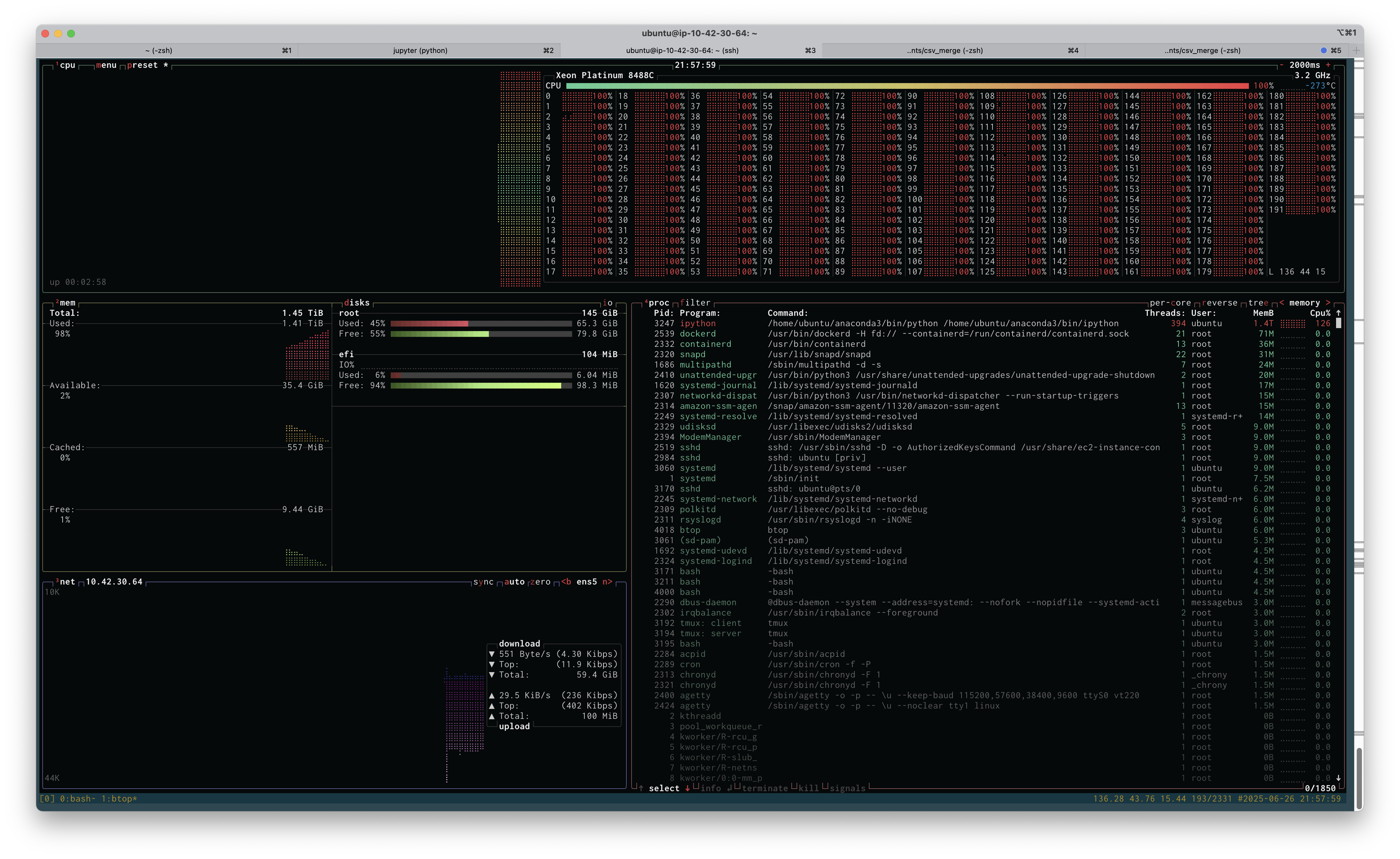
btop view of a large linux instance

Above is a screenshot of btop running on the r7i.48xlarge instance while I attempted to run my analysis. If you click on the image, you'll see the full size screenshot. You'll see that I'm about to run out of memory: 1.41TB used of 1.45TB. You'll also see that I'm using all 192 cores at 100% load (the cores are labeled 0-191). Unfortunately, throwing all this memory at the problem didn't work, I ran out of memory, and I had to resort to being more clever. Being clever took more time, of course, but if the high-RAM instance had worked, it would have paid off.

Playing with various server configuration tools (like this one) shows that the r7i.48xlarge would cost at least $60,000. This is not something that I need very often, and purchasing something this large would be ridiculous. However, renting it for half an hour, if it saves me a few hours, is definitely worth it. Also, it's kind of fun to say "yeah, I used 1.5TB of memory and 192 cores and it wasn't enough."


Polars scan_csv and sink_parquet

The documentation for polars is not the best, and figuring out how to do this below took me over an hour. Here's how to read in a headerless csv file into a LazyFrame using scan_csv and write it to a parquet file using sink_parquet. The key is to use with_column_names and schema_overrides. Despite what the documentation says, using schema doesn't work as you might imagine and sink_parquet returns with a cryptic error about the dataframe missing column a.

This is just a simplified version of what I actually am trying to do, but that's the best way to drill down to the issue. Maybe the search engines will find this and save someone else an hour of frustration.

import numpy as np
import polars as pl

df = pl.DataFrame(
    {"a": [str(i) for i in np.arange(10)], "b": np.random.random(10)},
)
df.write_csv("/tmp/stuff.csv", include_header=False)

lf = pl.scan_csv(
    "/tmp/stuff.csv",
    has_header=False,
    schema_overrides={
        "a": pl.String,
        "b": pl.Float64,
    },
    with_column_names=lambda _: ["a", "b"],
)

lf.sink_parquet("/tmp/stuff.parquet")

Pages

  • 30 Years On
  • About Stephen Skory
  • My Cycling History
  • Solar Water Heater